
My Paint Art1.0.20 - Google Play
You'll be able to see results in few seconds.
Publisher Description


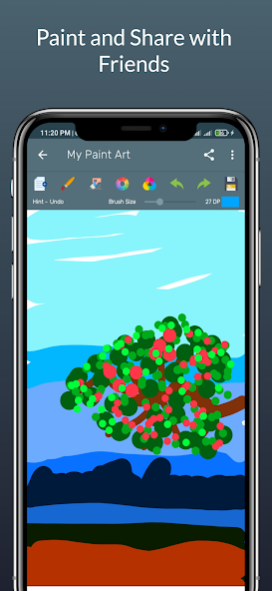

Introducing "My Paint Art", an unparalleled digital canvas right at your fingertips! Breathe life into your artistic visions on our dynamic painting and drawing platform available on the Play Store. Whether you prefer finger strokes or using a stylus, our platform is the playground where creativity meets fun!
Experience the joy of crafting enchanting illustrations, or step into the world of learning as you teach your little ones their ABCs. "My Paint Art" is more than just an app - it's an invitation to the world of art and education, all from the comfort of your phone or tablet.
Our lightweight app comes absolutely free, making quality art education accessible to all. It's not just about introducing someone to drawing; it's about igniting a lifelong love for art.
Key Features of "My Paint Art":
✔ Versatile Drawing Tools: Use your fingers or a stylus to let your imagination run wild.
✔ Unlimited Color Palette: Dive into the world of colors and bring your drawings to life.
✔ Instant Saving: Your masterpieces are secured as soon as they are created.
✔ Advanced Editing Tools: Undo, redo, or erase any part of your drawing with ease.
✔ Customizable Brush Size: Minimize or maximize the brush size as per your preference.
✔ Manage Your Artwork: Seamlessly manage all your drawings from within the app.
✔ Background Color Selection: Set the mood of your artwork by choosing from a variety of background colors.
And so much more!
With "My Paint Art", everyone can be an artist. Start your creative journey today!
About My Paint Art
The company that develops My Paint Art is Md Tayobur Rahman. The latest version released by its developer is 1.0.20.
To install My Paint Art on your Android device, just click the green Continue To App button above to start the installation process. The app is listed on our website since 2023-05-12 and was downloaded 0 times. We have already checked if the download link is safe, however for your own protection we recommend that you scan the downloaded app with your antivirus. Your antivirus may detect the My Paint Art as malware as malware if the download link to droidrocks.com.mypaintart is broken.
How to install My Paint Art on your Android device:
- Click on the Continue To App button on our website. This will redirect you to Google Play.
- Once the My Paint Art is shown in the Google Play listing of your Android device, you can start its download and installation. Tap on the Install button located below the search bar and to the right of the app icon.
- A pop-up window with the permissions required by My Paint Art will be shown. Click on Accept to continue the process.
- My Paint Art will be downloaded onto your device, displaying a progress. Once the download completes, the installation will start and you'll get a notification after the installation is finished.
Program Details
System requirements
Download information
Pricing
Version History
version 1.0.20
posted on 2023-05-12
- New Bug fix
- enhance performance
version 1.0.9
posted on 2021-11-02
- New Bug fix
- enhance performance
- share option error resolve
version 1.0.6
posted on 2021-09-10
- Updated Some UI Design
version 1.0.5
posted on 2021-08-25
- new bug fixed
version 1.0.3
posted on 2021-07-11
- new bug fix
- support fingers/stylus
- draw pictures with unlimited colors
- save instantly
- contains ads
- undo, redo your drawing
- erase any point
- minimize and maximize brush size.
- manage your drawings from inside the app.
- you can set the color in the background
- many more
Disclaimer
Official Google Play Link
We do not host My Paint Art on our servers. We did not scan it for viruses, adware, spyware or other type of malware. This app is hosted by Google and passed their terms and conditions to be listed there. We recommend caution when installing it.
The Google Play link for My Paint Art is provided to you by apps112.com without any warranties, representations or guarantees of any kind, so access it at your own risk.
If you have questions regarding this particular app contact the publisher directly. For questions about the functionalities of apps112.com contact us.
